An AI task manager for your Mac. Tell Claude, and it's on your board.
nokko-mcp is a free MCP server: Claude, Cursor and Codex can read your projects, add and complete tasks and log your hours, in plain Markdown files on your Mac.
brew install --cask anemo-studio/tap/nokko-mcpnokko · add_task
nokko · log_time
Tasks
Works with
- Claude Desktop
- Claude Code
- Cursor
- Codex
- VS Code
Use Claude as your to-do list. Ask in your own words.
“How's my week looking?”
→ nokko · get_overview
“What's overdue on Storefront?”
→ nokko · find_tasks
“Move the homepage hero to In Progress and give it to Jonas.”
→ nokko · update_task
“Add a subtask: export the logo as SVG.”
→ nokko · add_task
“1h30m on onboarding from 9:00, note “user interviews”.”
→ nokko · log_time
“Mark the invoice reminder done.”
→ nokko · complete_task
Set up in two minutes.
Install
brew install --cask anemo-studio/tap/nokko-mcpConnect your AI app
Ask
claude mcp add nokko -- nokko-mcp --vault ~/Work{
"mcpServers": {
"nokko": {
"command": "/opt/homebrew/bin/nokko-mcp",
"args": ["--vault", "/Users/you/Work"]
}
}
}{
"mcpServers": {
"nokko": {
"command": "npx",
"args": ["-y", "nokko-mcp"],
"env": { "NOKKO_VAULT": "/Users/you/Work" }
}
}
}[mcp_servers.nokko]
command = "nokko-mcp"
args = ["--vault", "/Users/you/Work"]AI time tracking that ends on the invoice.
Say what you worked on. The hours land under the task, and nokko bills them.
“I spent 1h30m on the logo proposal from 9:00, first draft.”
→ nokko · log_time
Storefront.md## Tasks- [ ] Send the logo proposal ⏫ 📅 2026-10-16- ⏱ 2026-10-14 09:00-10:30 (1h30m) — first draft- [/] Homepage hero [Assignee:: Jonas] #design- [x] Kick-off call ✅ 2026-10-02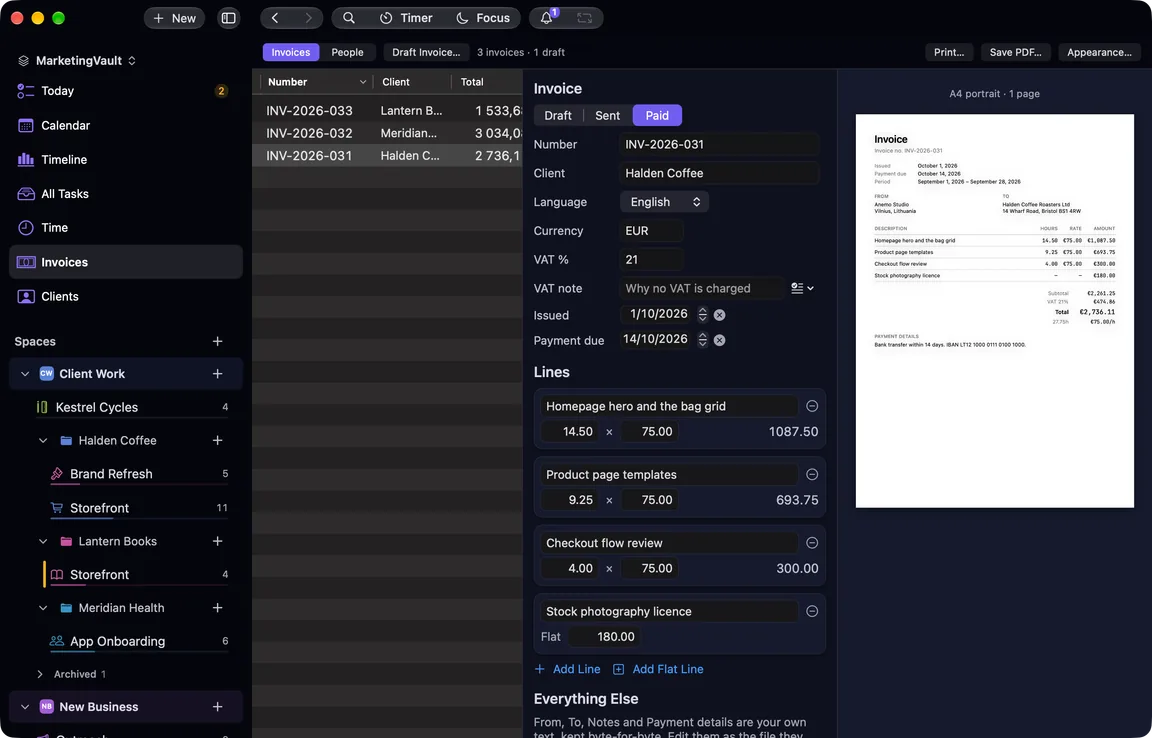

An Obsidian MCP server for your tasks
Point it at your vault. No plugin, and Obsidian can stay closed. It works on tasks, not the prose in your notes.
No MCP? Any AI that edits files works
Your projects are plain text, so Claude Code, Codex or Cursor can edit them directly. The server is the safer way: it re-reads every file before it writes.
Client Work/Halden Coffee/Storefront.md
## Tasks- - [ ] Send the logo proposal ⏫ 📅 2026-10-16+ - [x] Send the logo proposal ⏫ 📅 2026-10-16 ✅ 2026-10-14 - [/] Homepage hero [Assignee:: Jonas] #designIt stays in its lane.
- Only the folder you choose
- Sends nothing anywhere
- Can't delete tasks or files
- A read-only switch
Task apps and AI, side by side.
From each product's own site on 27 November 2026. Where we could not find a feature, the cell says Not listed.
| Capability | nokko | TaskForge | Todoist | Things 3 | Toggl Track |
|---|---|---|---|---|---|
| Official MCP server | Yes | Yes | Yes | Community servers only | Yes |
| Runs on your Mac, no account | Yes | Yes | Hosted; Todoist account | Not listed | Toggl account |
| Tasks in plain Markdown files | Yes | Yes | No | No | No |
| Log time through the AI | Yes | Not listed | Not listed | Not listed | Yes |
| Invoices drafted from logged hours | Yes | Not listed | Not listed | Not listed | Yes |
| Gantt timeline | Yes | Not listed | Not listed | Not listed | Not listed |
Swipe sideways for the other columns.
Questions people ask first
Does nokko have an MCP server?
Yes. nokko-mcp is a free, local MCP server for the Mac, listed on the official MCP Registry as dev.nokko/nokko. Install it with Homebrew (brew install --cask anemo-studio/tap/nokko-mcp) or run it with npx -y nokko-mcp.
How do I let Claude manage my to-do list?
Install nokko-mcp, add it to Claude Desktop or Claude Code with the folder your tasks are in, and ask in plain words: what's due, add this, move that, mark it done. Claude calls the server's tools, and the change lands in your Markdown files.
Which AI apps work with nokko-mcp?
Any app that can run a local MCP server: Claude Desktop, Claude Code, Cursor, Codex, VS Code and others. Apps that only connect to hosted servers, such as ChatGPT in a browser, cannot start it.
Can Claude read and edit my Obsidian vault with it?
Its tasks, yes: nokko-mcp reads and writes the Obsidian Tasks format across the vault, with no plugin and without Obsidian open. It does not read or write the prose of your notes.
Do I need MCP to use AI with nokko?
No. nokko's data is plain Markdown, so any AI that can edit files can work on it directly. The MCP server makes it safer: it re-reads before writing and refuses an edit when the file changed underneath it.
Is there an MCP server for time tracking and invoicing?
nokko-mcp logs time: the AI writes a dated span under a task, and the nokko app totals the hours by client and drafts invoices from them. The hours stay in your own files rather than in a time-tracking service.
Does Things 3 or Todoist have an MCP server?
As of November 2026, Todoist offers an official hosted MCP server that signs in to your Todoist account, and Cultured Code lists none for Things 3, which has only community-made servers. nokko-mcp is official, runs on your Mac and needs no account.
What can it do, exactly?
Nine tools: get_overview, list_projects, get_project and find_tasks to read; add_task, update_task and complete_task to change tasks (dates, priority, assignee, estimate, tags, status, subtasks; a recurring task gets its next occurrence); log_time to record worked time; get_format_guide to explain the file format.
Is it free, and do I need the nokko app?
It is free. It works on the files even without the app; with nokko open, you see each change appear on your boards, timeline and timesheet.
Does it send my projects anywhere, or delete anything?
No. It makes no network connections, keeps nothing and has no delete tools. It refuses a change when the file is no longer as it read it, and --read-only limits it to reading.
Give your AI the keys to your task list, not your data.
nokko-mcp is free and works on its own. The nokko app shows every change on your boards, timeline and invoices.
brew install --cask anemo-studio/tap/nokko-mcp